I Tried a Bunch of USB-C Accessories for the iPhone 15 Pro
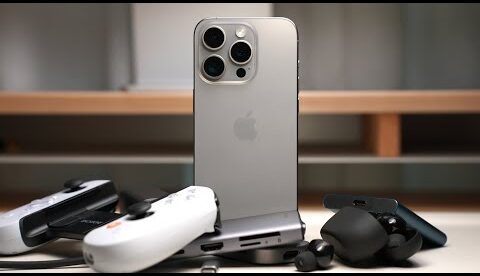
With this USB type-c port let’s try some accessories you might now be interested in for your iphone. Like external SSDs. Everyone hates running out of space on their iphone when taking pictures, and some of us don’t want to spend so much money on storage on a phone that we’ll outgrow in 3 or so years. So with an external SSD like this samsung T7 or Synology BeeDrive you can get a ton of storage without paying $500 for a TB of space. And they can be used with your ipad, mac, android, and PC too. You can offload anything you have in the “files” app on your iphone to an external drive. And if you want to send photos or videos to your external drive, just open the photos app, select the items, press the share button, then save to files and choose your external drive. Easy. External drives can also be used as a saving location for videos you take from the iphone 15 Pro or Pro Max when plugged in, which frees up some space on your phone, if you were planning to just offload the footage onto your computer anyway to edit it. Overall, I like the convenience that external ssds provide, because they’re not too big but give me space back on my iphone, ipad and Mac.
Check out our Sponsor Speck’s NEW Presidio2 Cases and Accessories using promo code JTW15 for 15% before 10/30/23:
iPhone 15 Series Cases:
Clicklock Accessories:
Affiliate Links to Products Mentioned in the Video:
iPhone 15 Pro:
Samsung T7 SSD:
Anker 65W GAN Charger:
Lightning to USB-C charging adapter:
Backbone One Gamepad:
PS5 DualSense Phone Mount:
Baseus USB-C Hub:
Apple AirPods Pro USB-C:
Sony WF1000XM5 Wireless Earbuds:
Timestamps:
0:00 Introduction
1:57 Why Did They Switch to USB-C?
2:32 External Storage
5:43 Chargers
6:41 USB-C to Lightning Adapters
8:20 Gamepads
10:25 USB-C Hubs and Dongles
11:48 Wireless Earbuds
12:56 Bonus Recommendation
13:20 Conclusion
Okay. So during the Apple event they really liked highlighting the gaming potential of the iphone. They sell a lightning version for older iphones or a usb-c version for every other phone. The USB-C version supports the iphone 15 series, has the courage to add back the headphone jack and a usb-c port for passthrough charging. I can confirm all of the functionality works fine. And oh god. I’m playing this game again. Help me. The nice thing about the backbone one is that you can use it with your windows pc, mac, android tablet, or ipad by connecting to them through the usb-c port. So the backbone has been a great laying in-bed hand held controller for when I want to play ios games or remote play into a PS5. It also makes a great portable game controller for travel too.
I mentioned earlier that the usb-c port on the iphone supports doing a lot of things, and I highly recommend you get a usb-c hub of some kind that supports all the functions you need. The port can handle video, audio, charging, and data. So having something like this usb-c hub that has all those features in one, is really nice, because you can use it with your computer and tablet too. So I can plug my iphone into this, and into an hdmi cable, and have all of my screen mirrored to the monitor or TV. I can plug in SD cards and move photos and videos on or off my phone and plug in any other accessories I need and still charge it in the process too. It’s a nice little emergency tech item that works for all your devices.
Then there are a ton of magsafe accessories that can be used for all iphones starting with the 12. There are a ton of these that add a bunch of cool functionality to your iphone. To save you some time, and not repeat myself, I’ve made a video talking about all of those already. So if you’re interested in that check out the link above.
iPhones with USB-C support charging wireless earbuds and smartwatches with a usb-c cable. As if your phone was the battery bank. And I’m happy that this works for both apple and non-apple products. Airpods and Airpods pro were updated with USB-C and work seamlessly if you own a bunch of apple products. I can use mine without having to touch any settings between my Macbook pro, mac studio, iphone, and ipad. But the moment you want to use them with other devices, pairing them and changing settings can be a pain. So if you have an iphone but not a lot of other apple products, I’d look at wireless earbuds with usb-c ports that have multipoint capabilities. Like the Sony WF-1000XM5s. Multipoint enable these to pair to multiple devices and switch between them. I really like the WF-1000XM5s because you get a ton of customizability in Sony’s headphones app, and feature for feature, spec for spec, these Sony’s match up to the Airpods Pro really really well. But if you’re primarily using apple products. Airpods are the way to go.
So I’m still on IPhone 8. I would rather get 14 pro refurbished to save money and I really just want the better camera. If I went with 15 pro sounds like I can still use my older external mics but have to get the USB C adapter? Is that right? Also in other videos I saw a lot of comments people saying the volume of headphones was low? Is that true? I’m just researching until I have to get a new phone.
With the USB-C hubs, ensure they have a power passthrough. Not all of them do, and then the hub and peripherals will just drain your phone battery like crazy.
Not sure if you reply to comments or not. I was wondering if you have managed to find a USB-C Hub that supports Pass Through CarPlay. I have wired CarPlay in my 2018 Mazda 3 and have been looking for this for years. Why? Well I store a lot of my music in Hi-Res FLAC on a Micro-SD Card (1TB / 10,000 songs). but of course I have to plug it into the USB-C port on the phone which means I can’t charge it nor use the card reader. I also use a USB-C to 3.5mm for much better sound via my Aux connector in the card. The only compromise I have found so far is a USB Wireless CarPlay adapter which I can plug into the car’s USB port and then the hub into the phone to connect SD Card USB-C to 3.5mm adapter & Charging. But the wireless USB CarPlay adapter is much less responsive than the wired CarPlay and also causes issues sometimes where I have to unplug it for awhile or restart the card Infotainment computer. I have tried 4 or 5 different Wireless CarPlay adapters and they all suffer from this to some degree or other. Thanks in advance for your reply.
Carl.
USB C hub is nice for hooking phone up to exterior wired touch screen / avoid long-term low volume radiation poisoning and oxidative stress <3
0:50 btw this controller is called “Backbone” and it does have a lightning edition😂